.png)
Mailing Statuses and Delivery Tracking
Have you ever wondered what your mail status is and how you can track it? Find out how to check the status of your mailing and how to track its delivery in the article below.
In this article:
When a mailing campaign is activated, the mailer will go through several statuses in order.
Let's break down each status.
'Not Mailed' Status
This is the default step after activating a campaign. All mailings are Not Mailed until they are processed during an upcoming batch (determined by the Daily Send Count).

'Submitted' Status
'Submitted' mailings have been sent to our print & mail house, but have not yet been printed and mailed yet. Mailings will stay in the submitted status until they are printed and mailed or determined to be undeliverable.
Submitted mailings will be processed within 1-3 business days. Mailings submitted on Friday, Saturday, and Sunday will typically be processed the following business days (Monday/Tuesday).
Note: If a Campaign is paused or deleted, mailings that are in a Submitted status will still go through the process of getting printed and mailed out by our mail house.

'Mailed' Status
The 'Mailed' status means that the mailing has been printed and mailed out.

'Failed' Status
The 'Failed' status means that the mailing has failed to deliver. Hover over the "Failed" badge for more details. Typically this is due to an undeliverable address. Please note that failed mailers are determined during the printing process, these mailers are not printed nor sent out. With that being said, users will not be charged for failed mailers

Delivery Timeline
Please note that USPS delivery times can vary for several reasons, so delivery dates provided are an estimate.
With that being said, Standard mail can take between 2-8 business days before making it to its final destination. While First Class typically takes 1-3 business days.
Business days do not include weekends or holidays.
Previewing and Tracking Your Mailing
Once the status has changed to 'Mailed', you can track your mailing and view the expected date of delivery as well as see tracking information.


Please keep in mind that USPS takes 1-3 business days to send out the mail and 3-5 business days to have it delivered. Business days mean that Saturdays and Sundays don't count.
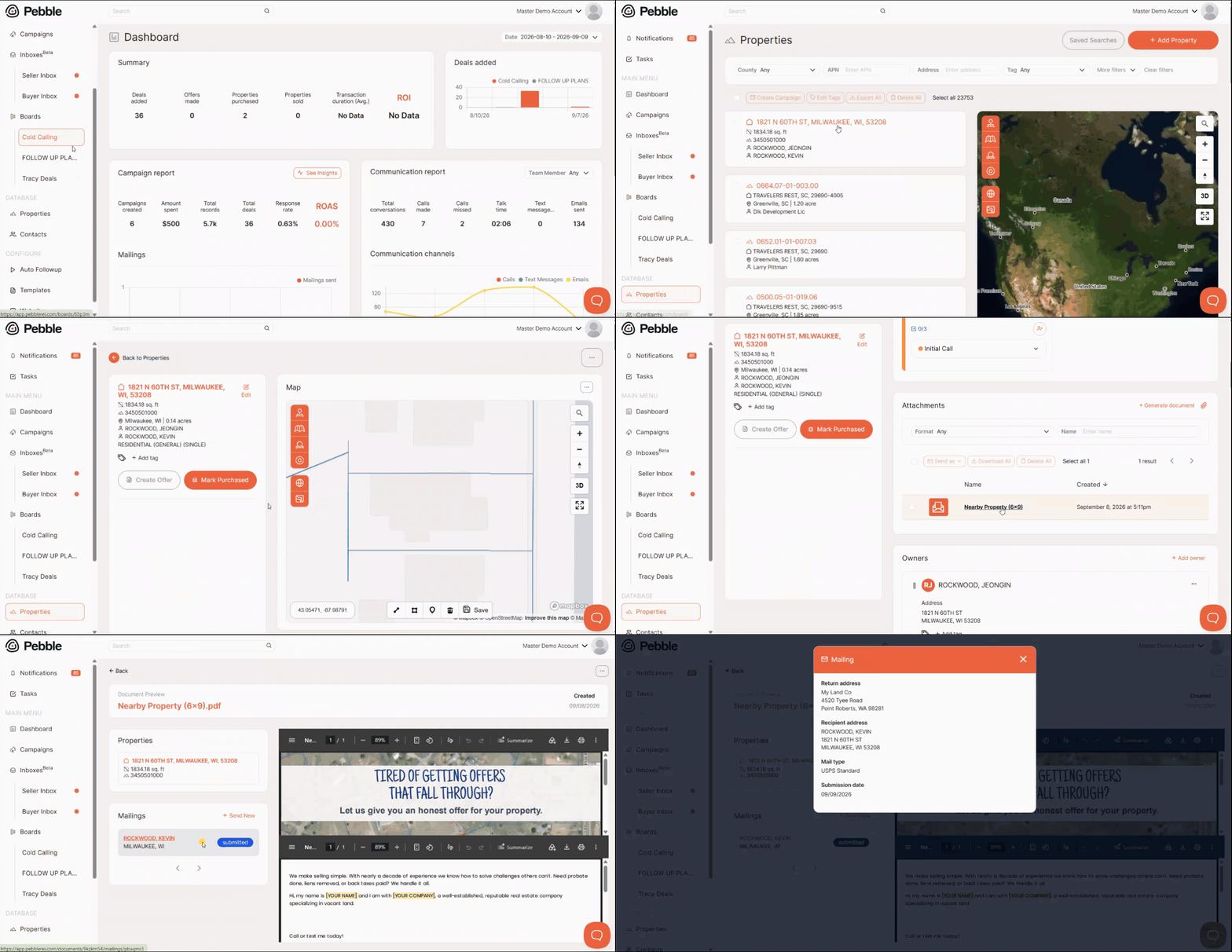
Checking the Status of a One-off Letter or Contract (from a Property)
The statuses above can also be checked at the individual-document level, not just for a campaign as a whole. This is useful when you need to confirm whether one specific letter, offer, or contract sent to one seller actually went out and was delivered.
- Go to the Properties page and open the property the document was sent from.
- In the property's Attachments area, find the generated document (letter, offer, contract, etc.) and click it.
- On the left side, find the Mailings section and click on the exact mailing event you'd like to check out.
- A pop-up will show up and the document's mailing status and tracking info will be shown alongside it, following the same statuses described above (Not Mailed / Submitted / Mailed / Failed).
What to Do If a Contact Says They Didn't Receive a "Delivered" Mailing
Occasionally a document will show as "Mailed" or "Delivered" in Pebble but the recipient reports never receiving it.
If this happens:
- First, double-check the address on file is correct. Most delivery issues trace back to an incorrect or outdated address.
- If tracking confirms the piece was delivered to the correct address, that means USPS completed delivery on their end. From there, what happens to it is outside of Pebble's visibility, and is most often a USPS handling issue or something on the recipient's side rather than something we're able to trace further ourselves.
- It's still worth flagging to our support team with the property/contact details, the document sent, and the date it was marked delivered. This helps us keep an eye out for patterns and confirm nothing was missed on our end. Please email hello@pebblerei.com for that.
- In the meantime, you can manually re-send the document to the contact so there's no delay for them.